
Bring the entire organization to the project.
The experience that built your company shouldn't stay locked in an operations manual. Square Up brings your standards, your clients' requirements and each job's contract to the project team in Procore: in plain words, to the right role, with the SOP cited.
Built on Procore. Read-only. A LaunchPad module.
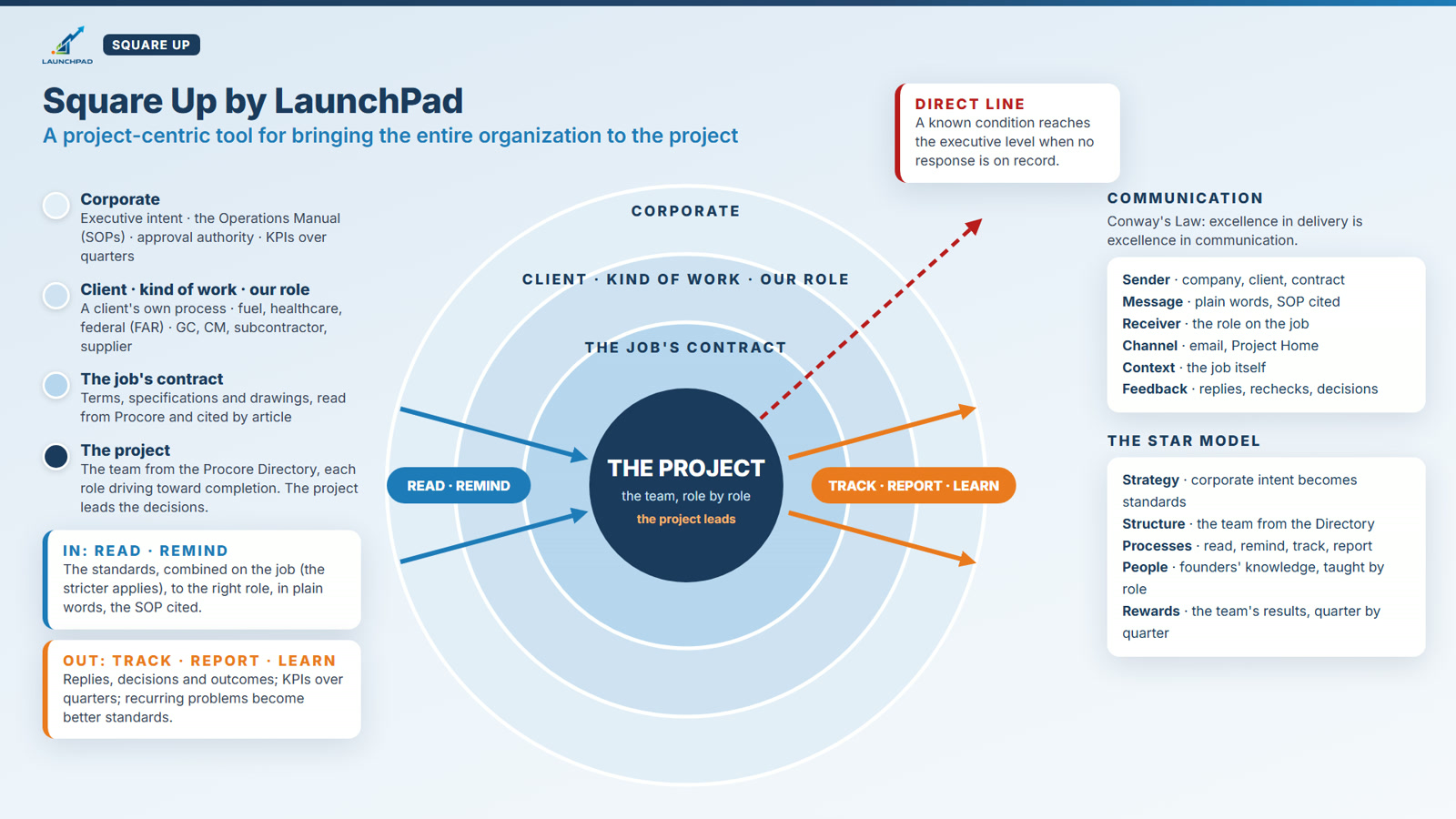
The project is the center.
Annie walks through Square Up on a sample company: a fuel center, a federal job and a crack in a footing. Why we built it, and what each person on the team sees.
Then see how it works ↓Read. Remind. Track. Report. Learn.
The standards come in from corporate, the client and the contract. The results go back out to leadership. The project team stays in the middle, doing the work.
- 1Read
Square Up reads the project in Procore
Change events, RFIs, submittals, daily logs, observations, photos, commitments and the job's contract. Read-only: it never changes your records.
- 2Remind
Each role hears what to do next
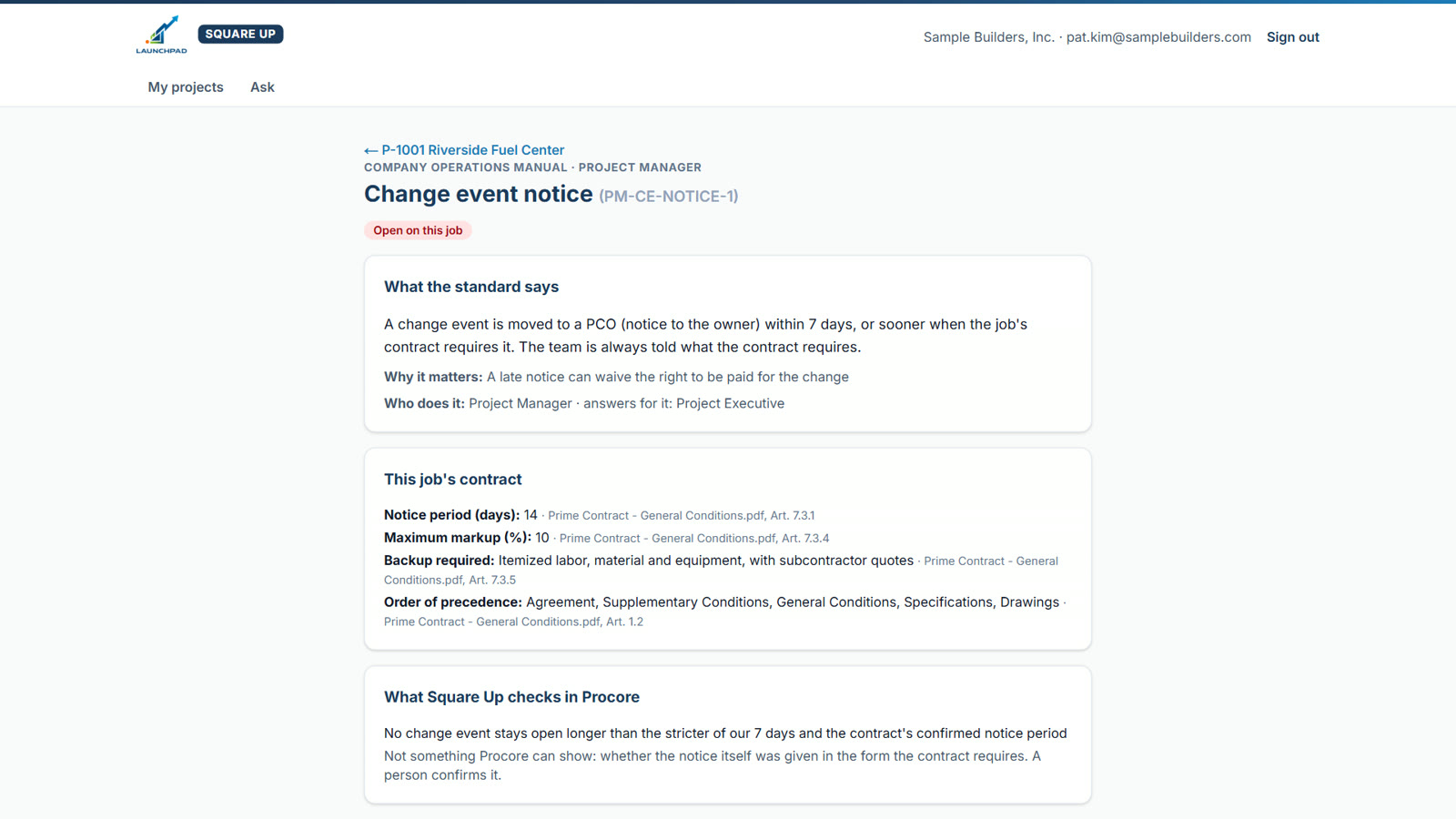
In plain words: what to do, the specific record, why it matters, and the SOP it comes from, linked to the page in your manual.
- 3Track
Replies are checked against Procore
People answer in their own words. Square Up reads Procore again before anything is closed. Nothing is closed on someone's word alone.
- 4Report
Leadership sees every job at once
A portfolio view and KPIs by quarter: what's open, who has it, and which jobs need attention, from the same record the team works in.
- 5Learn
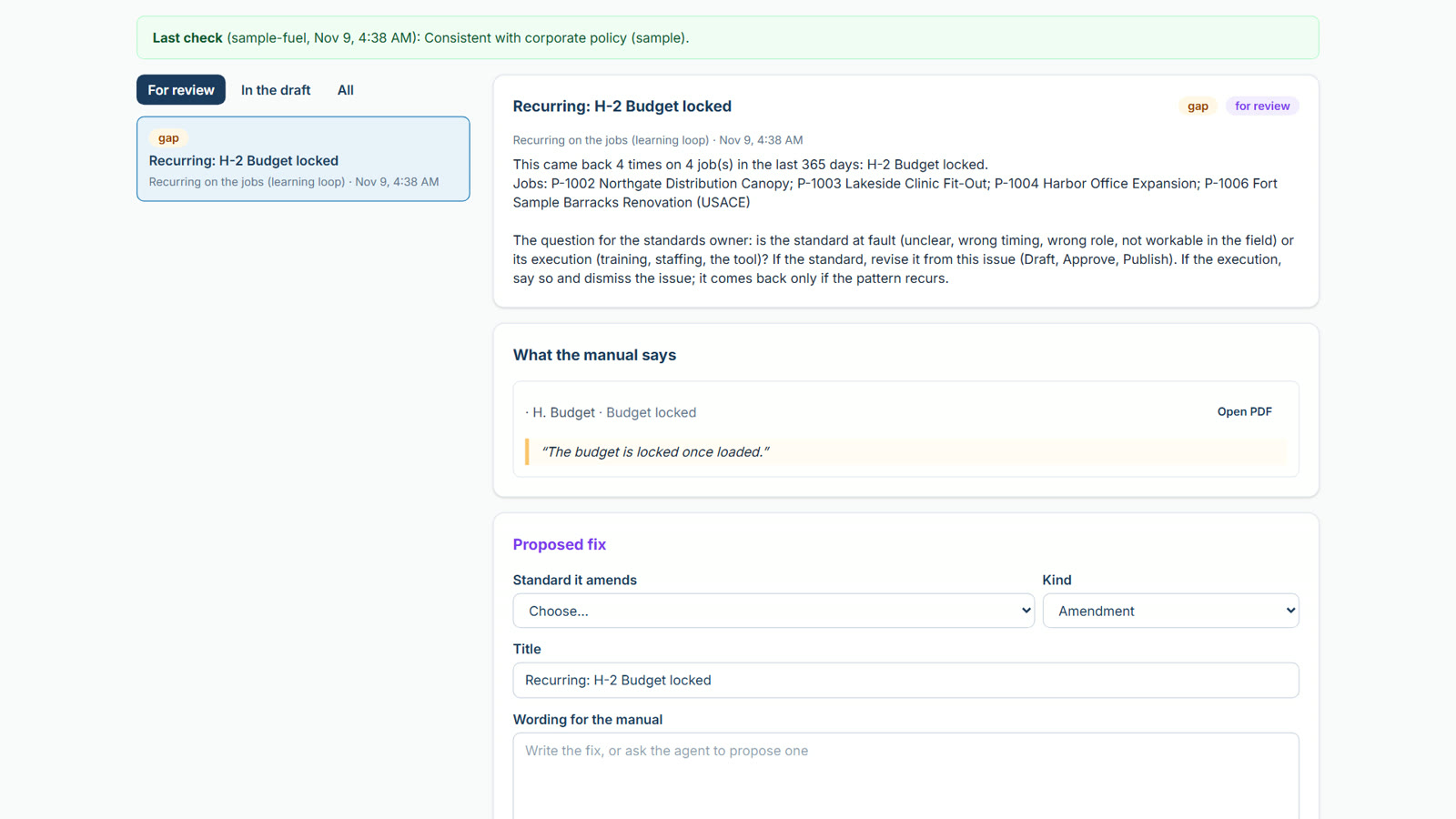
Recurring problems improve the standard
When the same item keeps coming back, the standard's owner is asked: is it the standard, or the execution? Every change is approved and versioned.
Standards built around the project, not the department.
Your corporate SOPs are the base. On top of them, Square Up builds programs for a client, a kind of work or your role on the job: a fuel client with its own change-order process, a federal job under the FAR, a project where you're the subcontractor. Your experienced people write them once. Every project that fits gets them, for accounting, the project administrator, the project manager and the superintendent.
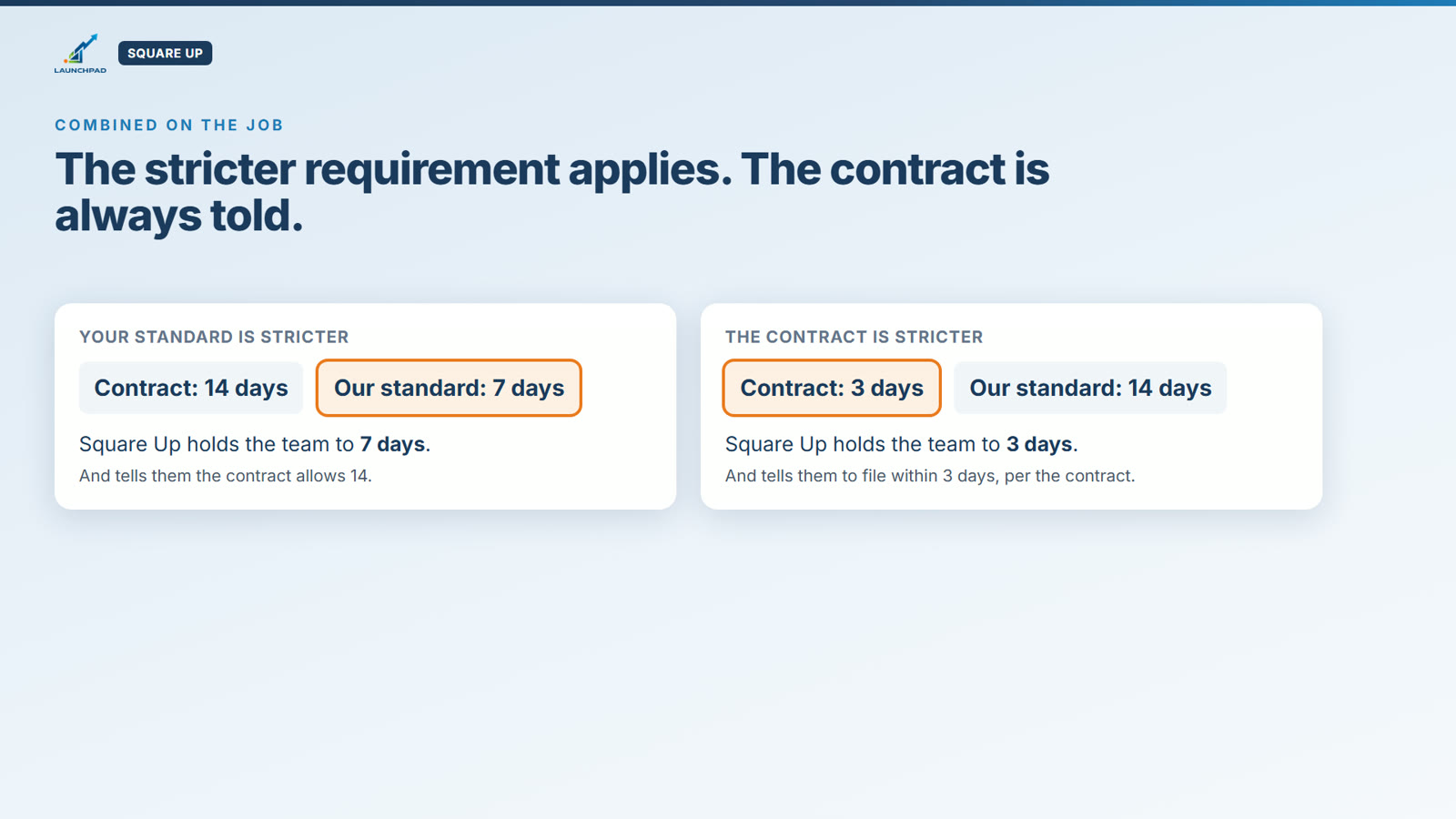
Then the job's own contract is read and combined with them on the project. Where two set the same requirement, the stricter one applies, and the team is always told what the contract requires.
Square Up holds the team to 7 days, and tells them the contract allows 14.
Square Up holds the team to 3 days, and tells them to file within 3 because the contract requires it.
The contractor must assert its right to an adjustment within 30 days of a written change order. The program carries that clause to every federal project.
Your standards, at the job, in plain words.
Project Home
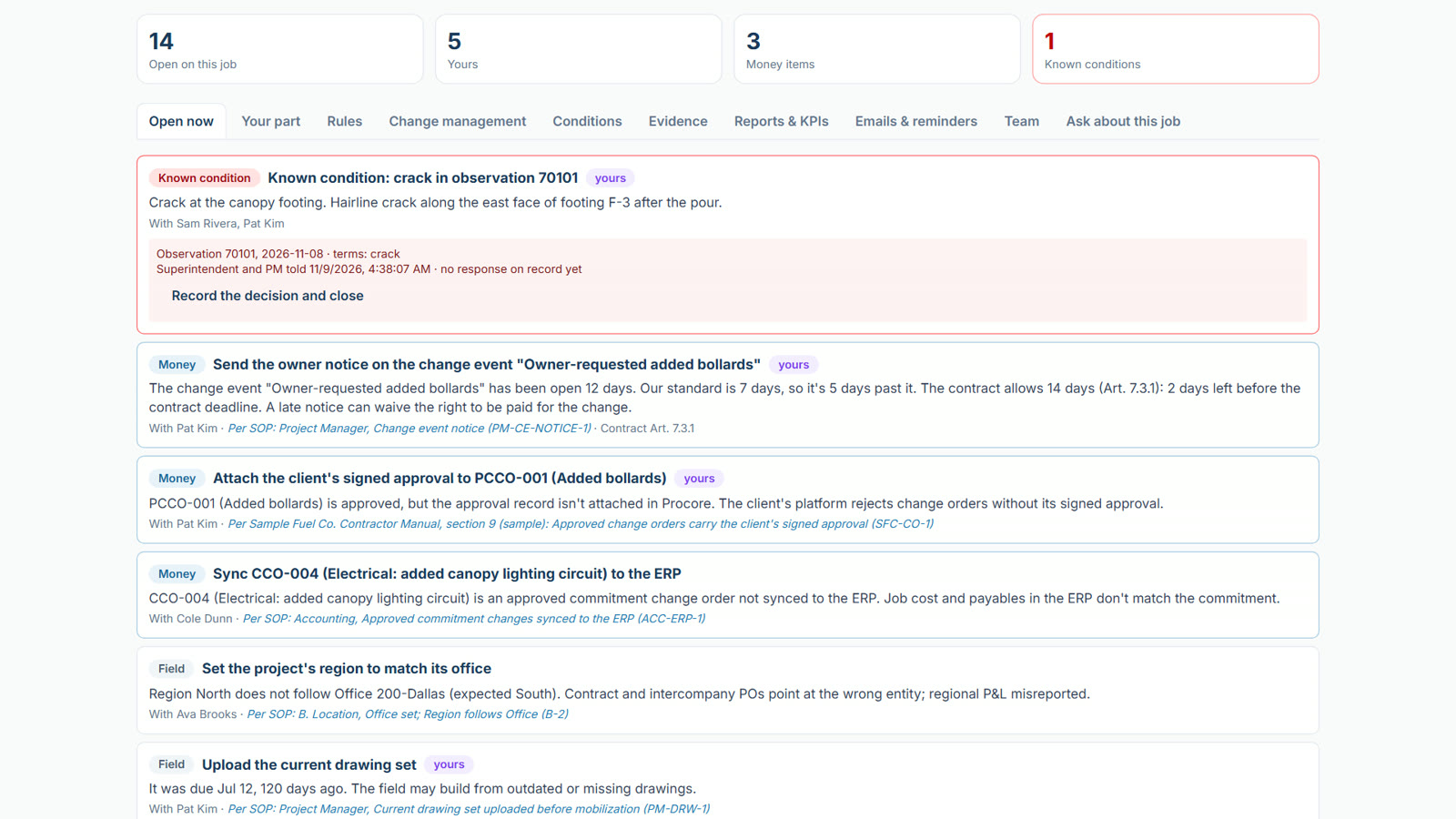
One page per job for the whole team: Open Now, Your part, the rules that apply, change management, conditions, evidence, reports and the team from your Procore Directory.
Plain-language directives
Every item reads as a directive: what to do, on which record, and why. The SOP is cited last and linked, so the reason is one click away.
Ask in your own words
AIA superintendent, project manager or administrator asks a question about the job and gets the standard that applies, drawn from the contract, the program and your SOPs, with every source cited.
Programs by client and kind of work
Build standards once for a client, a kind of work or your role on the job (GC, CM, subcontractor, supplier), and they apply to every project that fits.
The stricter requirement applies
Where the contract and your standard set the same deadline, Square Up holds the team to the stricter one and always tells them what the contract requires.
Approval authority, written down
Who can approve what, by role and by dollar amount, recorded in the standard and checked against the change orders in Procore.
Known conditions, a direct line up
When the team writes about a crack, deflection or movement, the job gets a known condition. If no response is on record in time, it reaches the executives.
Photo evidence review
AISquare Up looks at the photos the team posts and checks them against what the standard asks the record to show. A person always decides.
Your founders' knowledge, captured
AISquare Up interviews your experienced people in their own words and drafts what they know as standards for leadership to review and approve.
Your Operations Manual, governed
Start from LaunchPad's role-based library or your own manual. Drafts, review, approval and publication, with every version kept.
One email per person
Each person gets what's theirs on each job, not a report about everyone. Leadership gets the roll-up.
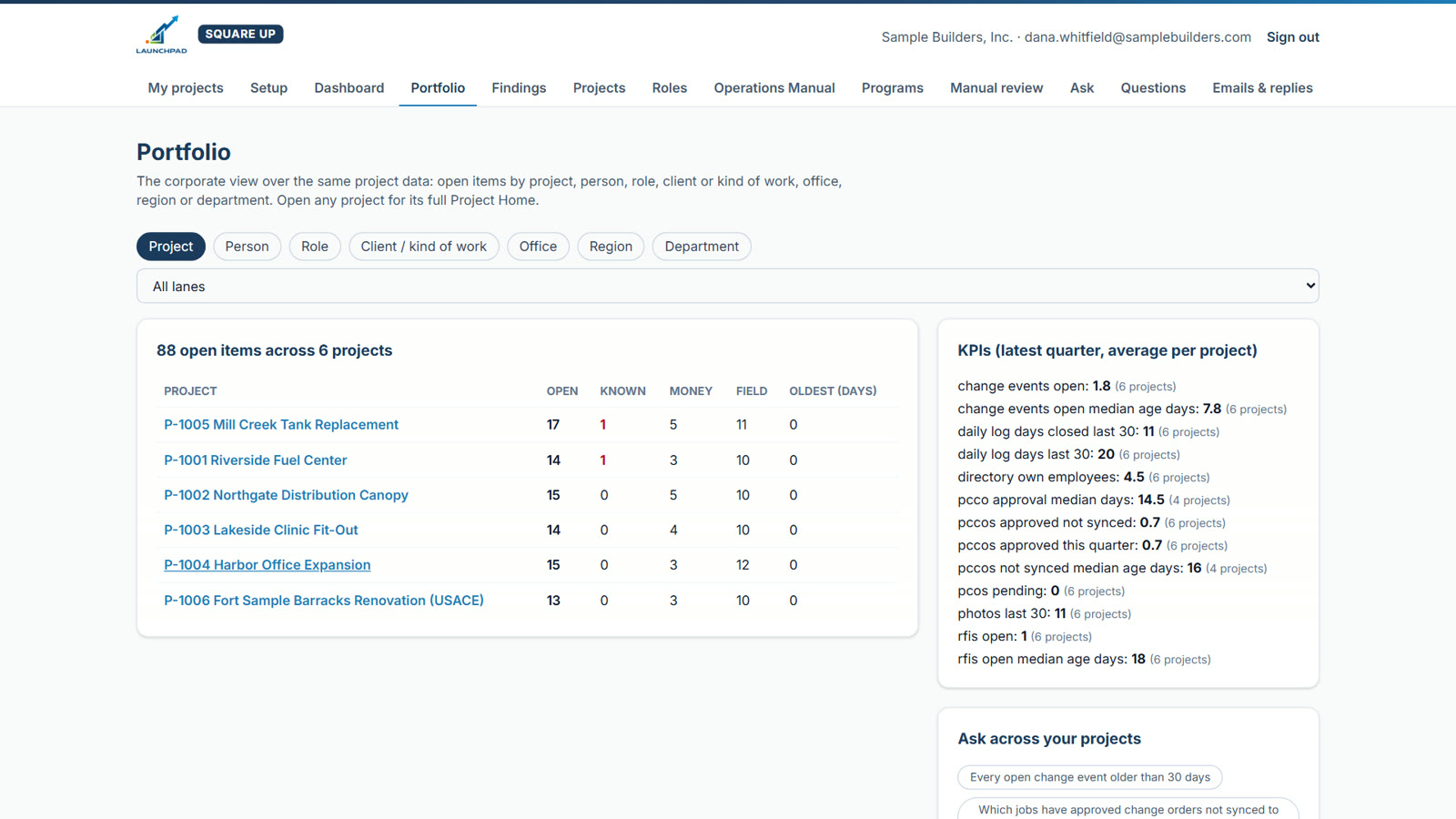
Portfolio and KPIs
Every job on one page, with results by role and by quarter, so you can see whether standards are reaching the work.
The right SOP for the moment, in common language.
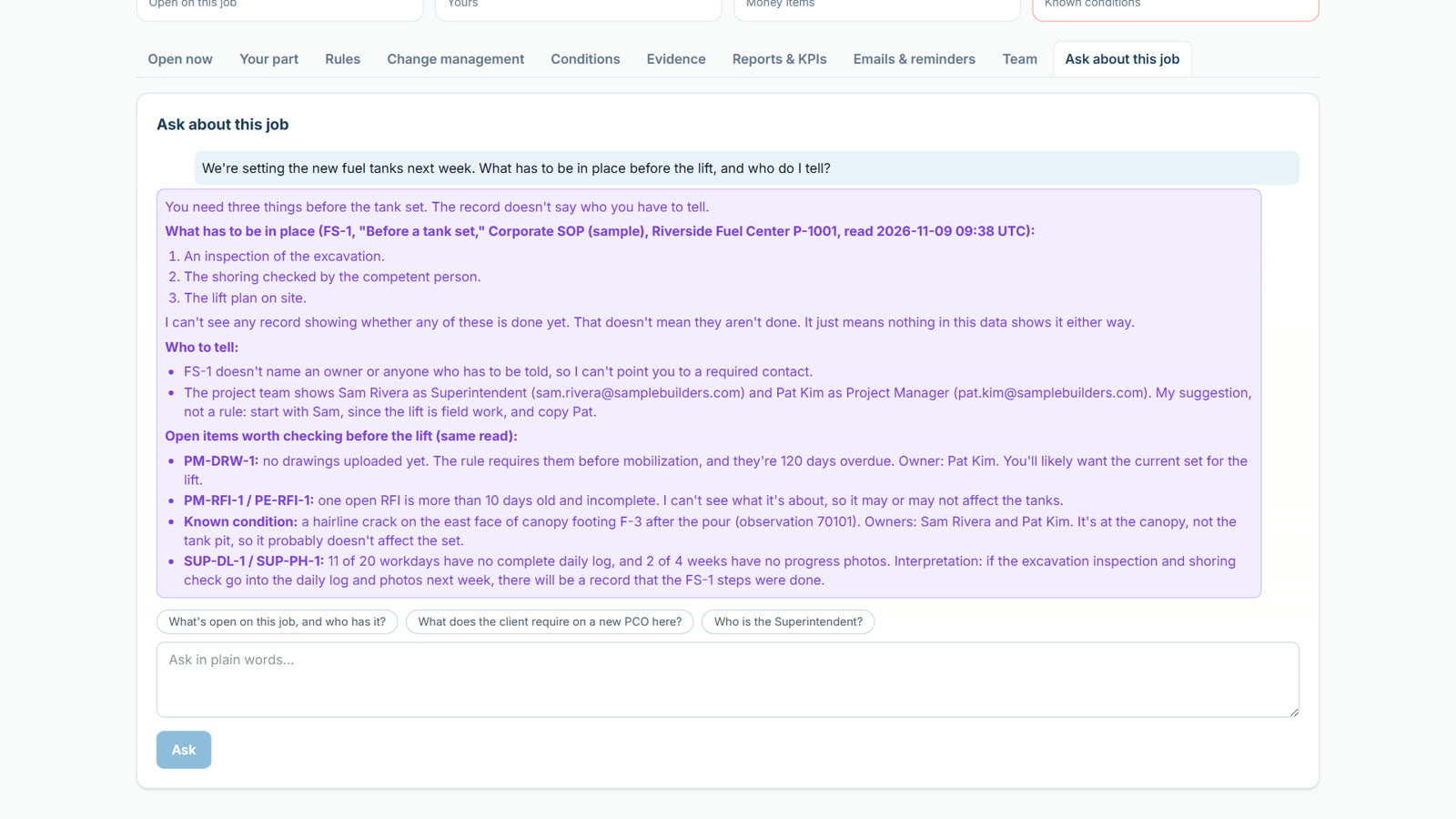
- Superintendent: “We're setting the new fuel tanks next week. What has to be in place before the lift, and who do I tell?”
- Project manager: “The owner wants more bollards. What do I do?”
- Administrator: “What's due on a federal change order?”
Each answer comes from the job's contract, the program for that client or kind of work, and your corporate SOPs, with every source cited.
A note in a system isn't a decision.
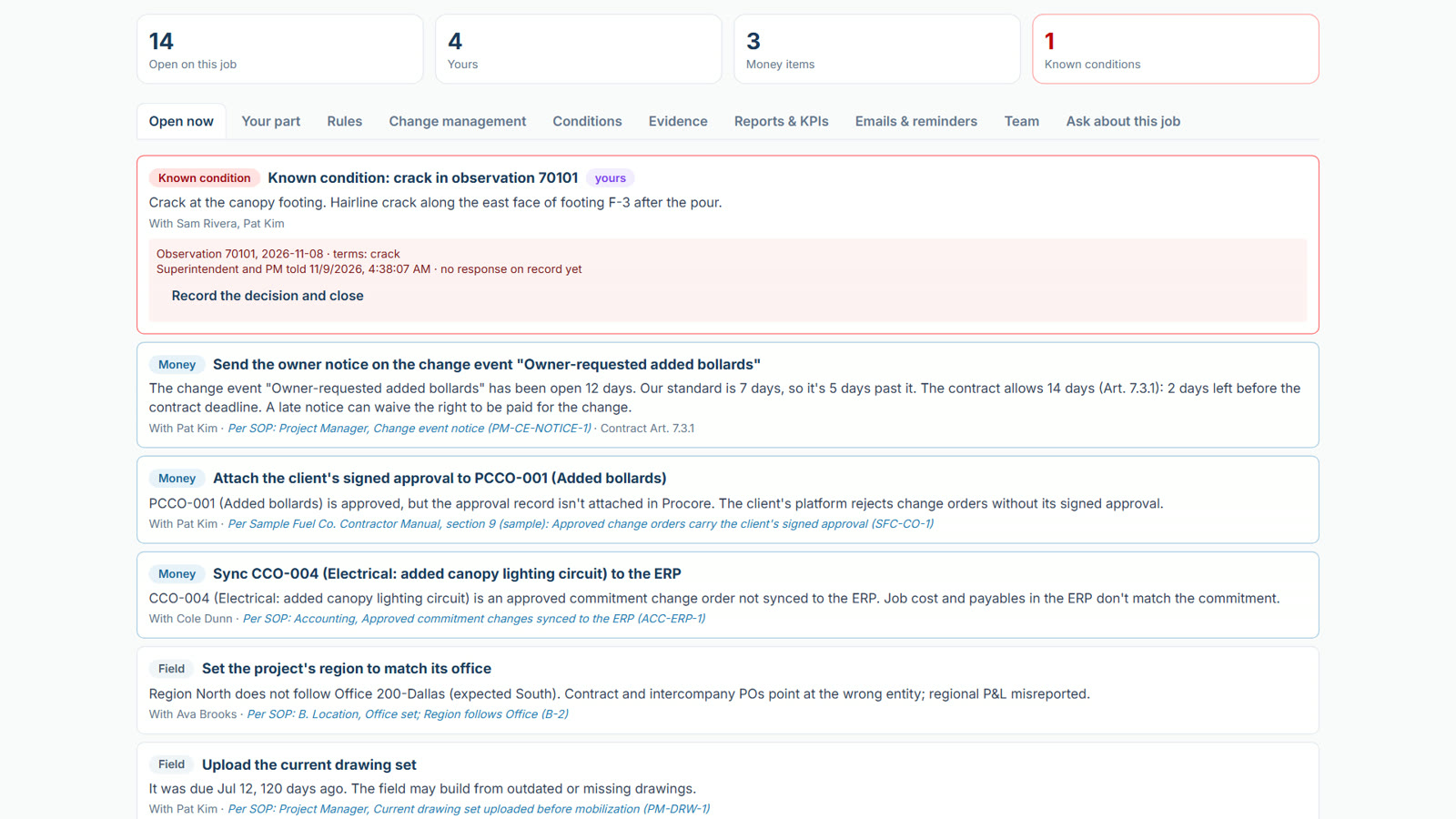
A superintendent records a hairline crack in a footing. That's exactly the right observation. Square Up makes sure it reaches the people with the authority to decide, and records who responded.
- Day 0The team writes about a crack, deflection, displacement, shoring or anchor movement in an observation, RFI, daily log or photo caption.
- At onceThe job gets a known condition at the top of Open Now. The superintendent and project manager are told.
- No response on recordIn the time your company sets, it goes to the project executive, then the company's executives.
- Approved firstThe escalation design itself is approved by an executive before one email goes out.
- Square Up doesn't judge the structure. That stays with your superintendent, your engineer and your safety professionals.
Every job at once. Better standards every quarter.
Your Procore stays the record.
Your team keeps working in Procore. Square Up reads the project, the Directory and the contract, and brings the organization's knowledge to it through Project Home and one email per person.
- Read-only on Procore
- Square Up reads your records and never changes them.
- Your standard, approved by your people
- Nothing becomes a standard because an agent suggested it. A person drafts it, an authorized person approves it, and every version is kept.
- Evidence, not opinion
- Every item names the Procore record behind it. AI writes the words; it never decides compliance.
- A gap in the record isn't an accusation
- A missing entry doesn't prove the work wasn't done, and Square Up says so.
- Unknown is not a failure
- No access, missing data or an undecided setting is reported as unknown, never held against anyone.
- It doesn't replace judgment
- Structural, safety and contract decisions stay with your superintendent, project manager, engineer and executives.
Priced around your company, not a price list.
Every company's standards are its own. Tell us about your company and your projects, and LaunchPad will put together a quote.
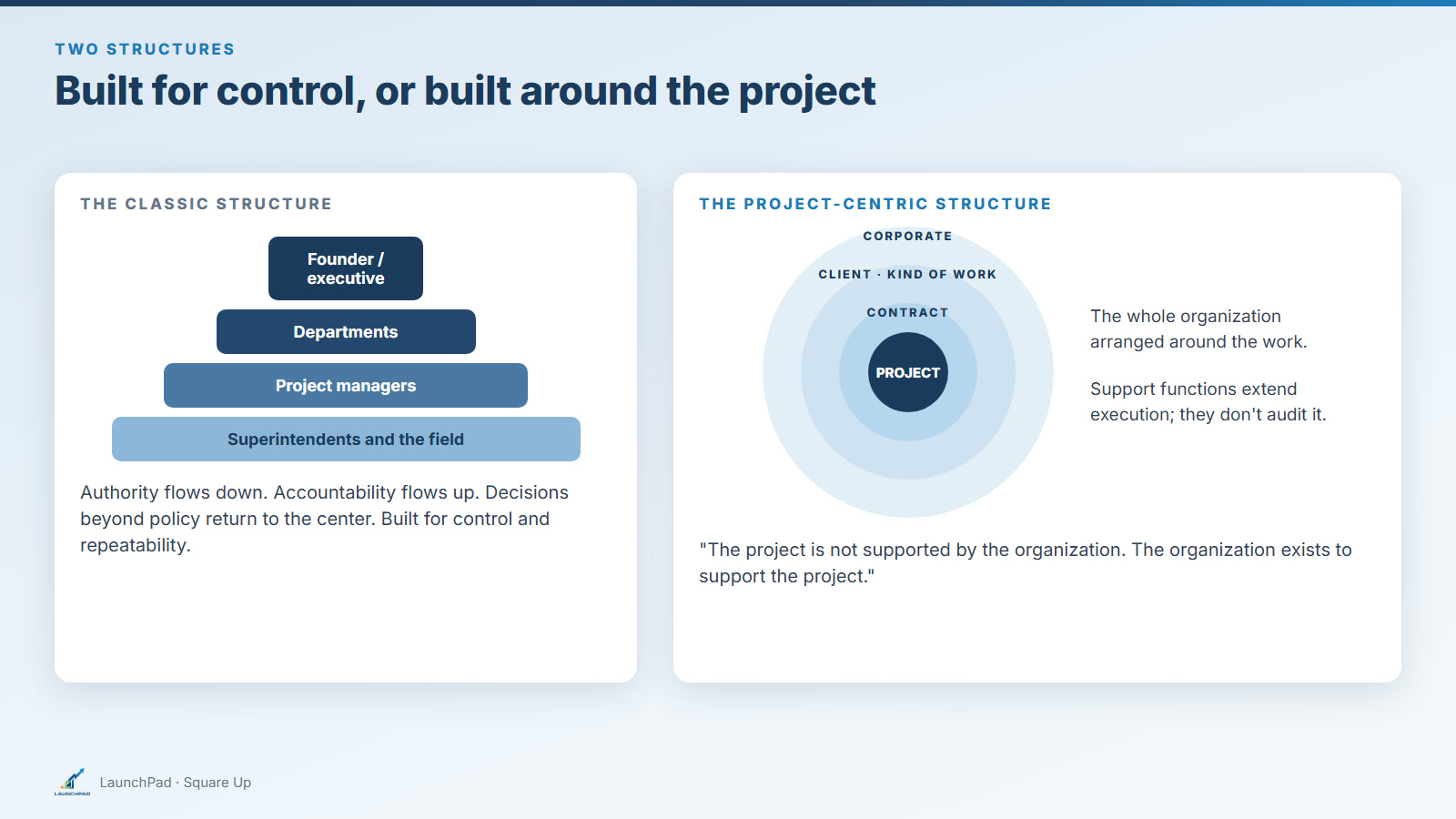
Bring the Organization to the Project
Why I built Square Up around the project-centric organization, and where P.M.I. and the P.M.O. fit.
Michael T. Dunn, Founder, LaunchPad
Read the article →The organization exists to support the project.
See Square Up on your own Procore projects.